顯示具有 app 標籤的文章。 顯示所有文章

2016年7月21日 星期四

[swift] How to make Localizable in SWIFT APP


1.Open Xcode and click  File->New->Project

2.Create a new project and choose Single View Application.


3.Input "Localizable" as app name


4. On "Localizable" app name , right click  and choose New File.
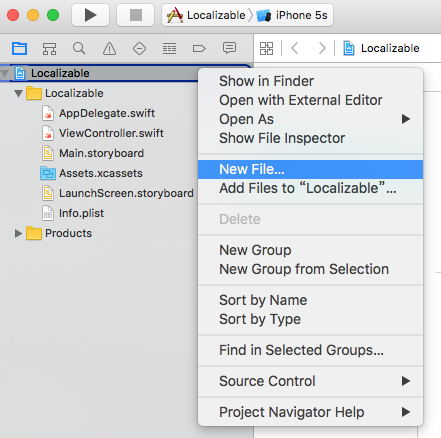


5. click "Resource" , "Strings File"

6. input "Localizable.strings" as file name


7.click "Localize


8. please choose "Base" and click "Localize"


9.To find "info" of "Localizations", and click add "+"


10. choose your language to your app


11. choose "Localizable.strings", and click "Finish"


12. You will have two files called "Localizable.strings"


13. at "Localizable.strings(Base)" input "test='TEST';"


14. at "Localizable.strings(Chinese)" input "test='測試';"


15. How to use

NSLocalizedString("test", comment: "")


2016年7月19日 星期二

[swift] swift make a app to call


import UIKit

class ViewController: UIViewController {
    @IBOutlet weak var labelTop: UILabel!
    @IBOutlet weak var labelDown: UILabel!

    override func viewDidLoad() {
        super.viewDidLoad()
        // Do any additional setup after loading the view, typically from a nib.
    }

    override func didReceiveMemoryWarning() {
        super.didReceiveMemoryWarning()
        // Dispose of any resources that can be recreated.
    }

    @IBAction func numberClick(sender: UIButton) {
        labelTop.text = labelTop.text! + sender.currentTitle!
    }
    @IBAction func clearClick(sender: UIButton) {
        labelTop.text = ""
        labelDown.text = ""
    }
    @IBAction func submitClick(sender: UIButton) {
        //labelTop.text?.characters.count
        
        if labelTop.text?.lengthOfBytesUsingEncoding(NSUTF8StringEncoding) == 10 {
            labelDown.text = "撥打電話:" + labelTop.text!
        }else{
            labelDown.text = "長度不足10"
        }
    }


}