顯示具有 swift 標籤的文章。 顯示所有文章

2016年7月28日 星期四

[swift] imageView Attributes

There are six pictures .


class ViewController: UIViewController {
    @IBOutlet weak var imageShow: UIImageView!

    var arrImg = ["img01","img02","img03","img04","img05","img06"]
    var images:Array<UIImage> = []
    var p:Int = 0
    var count:Int = 0
    override func viewDidLoad() {
        super.viewDidLoad()
        imageShow.image = UIImage(named: arrImg[p])
        count = arrImg.count
        for key in arrImg {
            images.append(UIImage(named: key)!)
        }
        imageShow.animationImages = images
        imageShow.animationDuration = NSTimeInterval(count * 1)
        imageShow.animationRepeatCount = 0
        
        // Do any additional setup after loading the view, typically from a nib.
    }

    override func didReceiveMemoryWarning() {
        super.didReceiveMemoryWarning()
        // Dispose of any resources that can be recreated.
    }

    @IBAction func prevClick(sender: UIButton) {
        p = p - 1
        if p < 0 {
            p = count - 1
        }
        imageShow.image = UIImage(named: arrImg[p])
    }

    @IBAction func nextClick(sender: UIButton) {
        p = p + 1
        if p == count {
            p = 0
        }
        imageShow.image = UIImage(named: arrImg[p])
    }
    @IBAction func playClick(sender: UIButton) {
        imageShow.startAnimating()
    }
    @IBAction func stopClick(sender: UIButton) {
        imageShow.stopAnimating()
    }
    @IBAction func borderClick(sender: UIButton) {
        imageShow.layer.borderColor =  UIColor.blueColor().CGColor
        imageShow.layer.borderWidth = 3
    }
    @IBAction func roundClick(sender: UIButton) {
        imageShow.layer.cornerRadius = 10.0
        imageShow.layer.masksToBounds = true
    }
    @IBAction func shadowClick(sender: UIButton) {
        imageShow.layer.shadowColor = UIColor.blackColor().CGColor
        imageShow.layer.shadowOffset = CGSizeMake(10.0, 10.0)
        imageShow.layer.shadowOpacity = 0.8
        imageShow.layer.shadowRadius = 5
    }
    @IBAction func normalClick(sender: UIButton) {
        imageShow.layer.borderWidth = 0
        imageShow.layer.cornerRadius = 0
        imageShow.layer.masksToBounds = false
        imageShow.layer.shadowOpacity = 0
    }

}

2016年7月21日 星期四

[swift] How to make Localizable in SWIFT APP


1.Open Xcode and click  File->New->Project

2.Create a new project and choose Single View Application.


3.Input "Localizable" as app name


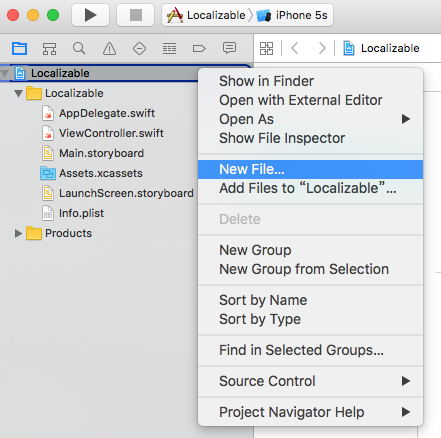
4. On "Localizable" app name , right click  and choose New File.


5. click "Resource" , "Strings File"

6. input "Localizable.strings" as file name


7.click "Localize" 


8. please choose "Base" and click "Localize"


9.To find "info" of "Localizations", and click add "+"


10. choose your language to your app


11. choose "Localizable.strings", and click "Finish"


12. You will have two files called "Localizable.strings"


13. at "Localizable.strings(Base)" input "test='TEST';"


14. at "Localizable.strings(Chinese)" input "test='測試';"


15. How to use

NSLocalizedString("test", comment: "")


[swift] Class MyViewController has no initializers - ERROR

If you have the error message , you can do this.

Class MyViewController has no initializers


var data:String

var data:String = ""
or 
var data:String?

[swift] nil cannot initialize specified type, swift

「nil cannot initialize specified type」
ERROR

var delegate:myDelegate = nil

change to 


var delegate:myDelegate? = nil


2016年7月19日 星期二

[swift] UIAlertAction,UIAlertController,ActionSheet

import UIKit

class ViewController: UIViewController {

    @IBOutlet weak var label1: UILabel!
    override func viewDidLoad() {
        super.viewDidLoad()
        // Do any additional setup after loading the view, typically from a nib.
    }

    override func didReceiveMemoryWarning() {
        super.didReceiveMemoryWarning()
        // Dispose of any resources that can be recreated.
    }

    @IBAction func showAlertView(sender: UIButton) {
        let alertController = UIAlertController(title: "會員登入", message: "請輸入帳號密碼", preferredStyle: .Alert)
        let button1 = UIAlertAction(title: "取消", style: .Default) { (button1) in
            
        }
        let button2 = UIAlertAction(title: "登入", style: .Default) { (button2) in
            let username = alertController.textFields?.first?.text
            let passwd = alertController.textFields?.last?.text
            if username == "class" && passwd == "a1234" {
                self.label1.text = "登入成功"
            }else{
                self.label1.text = "帳號密碼錯誤"
            }
        }
        
        alertController.addTextFieldWithConfigurationHandler { (textField) in
            textField.placeholder = "username"
        }
        
        alertController.addTextFieldWithConfigurationHandler { (textField) in
            textField.placeholder = "password"
            textField.secureTextEntry = true
        }
        
        alertController.addAction(button1)
        alertController.addAction(button2)
        self.presentViewController(alertController, animated: true, completion: nil)
    }
    
    @IBAction func showActionSheet(sender: UIButton) {
        let alertController = UIAlertController(title: "Office課程費用查詢", message: "請選擇課程種類", preferredStyle: .ActionSheet)
        let button1 = UIAlertAction(title: "Word", style: .Default) { (button1) in
            self.label1.text = "Word:$7000"
        }
        let button2 = UIAlertAction(title: "Excel", style: .Default) { (button2) in
            self.label1.text = "Excel:$7900"
        }
        
        let button3 = UIAlertAction(title: "PowerPoint", style: .Default) { (button3) in
            self.label1.text = "PowerPoint:$8500"
        }
        let button4 = UIAlertAction(title: "Access", style: .Default) { (button4) in
            self.label1.text = "Access:$10000"
        }
        
        alertController.addAction(button1)
        alertController.addAction(button2)
        alertController.addAction(button3)
        alertController.addAction(button4)
        self.presentViewController(alertController, animated: true, completion: nil)
    }


}


showAlertView畫面


登入成功時的畫面


登入失敗時的畫面


showActionSheet的畫面


點選後的訊息畫面


[swift] swift make a app to call


import UIKit

class ViewController: UIViewController {
    @IBOutlet weak var labelTop: UILabel!
    @IBOutlet weak var labelDown: UILabel!

    override func viewDidLoad() {
        super.viewDidLoad()
        // Do any additional setup after loading the view, typically from a nib.
    }

    override func didReceiveMemoryWarning() {
        super.didReceiveMemoryWarning()
        // Dispose of any resources that can be recreated.
    }

    @IBAction func numberClick(sender: UIButton) {
        labelTop.text = labelTop.text! + sender.currentTitle!
    }
    @IBAction func clearClick(sender: UIButton) {
        labelTop.text = ""
        labelDown.text = ""
    }
    @IBAction func submitClick(sender: UIButton) {
        //labelTop.text?.characters.count
        
        if labelTop.text?.lengthOfBytesUsingEncoding(NSUTF8StringEncoding) == 10 {
            labelDown.text = "撥打電話:" + labelTop.text!
        }else{
            labelDown.text = "長度不足10"
        }
    }


}